Sunday, May 11, 2008

Assemblies in the Silverlight Runtime

Note:
  • Details in this post apply to Silverlight 2 Beta 1, and may change in future Silverlight versions.
  • You may want to read my previous post to get a better understanding this post.

Say you have a Silverlight application with a Canvas and a ListBox. Both these controls belong to the same namespace System.Windows.Controls. Will these controls be downloaded as part of this particular application's xap, or will this be part of the Silverlight runtime installed initially by the user?

The answer is interesting: As far as Silverlight 2 Beta 1 is concerned, the Canvas is within the System.Windows.dll which is part of the Silverlight runtime and hence will not be downloaded to the client along with the xap. However, the ListBox is within the System.Windows.Controls.dll which is not included in the Silverlight runtime. So this will be downloaded with the xap package.

This also means that if you are creating a custom splash screen then you can use the Canvas within it, but not the ListBox since the splash screen will show before the xap has been downloaded.

Friday, May 9, 2008

Namespaces and Assembly Names

Note: Details in this post apply to Silverlight 2 Beta 1, and may change in future Silverlight versions. The basic idea though remains the same.

A Silverlight developer recently reported this problem. He wanted to use the Silverlight DataGrid in his application. He knew that the DataGrid is a part of the assembly System.Windows.Controls.Data.dll. So he added a reference to this assembly in his Silverlight project. So far so good.

Next he tried to import the namespace by typing in "using System.Windows.Controls.Data" so that he could start using the DataGrid. Now here started the problem. Visual Studio refused to recognize this namespace. Was this a bug in Silverlight, or perhaps in Visual Studio?

Neither. It is true that the DataGrid resides in the assembly System.Windows.Controls.Data.dll; but it is still part of the SystemWindows.Controls namespace just like the other controls in Silverlight.

Let us look at some other examples. The TextBlock, Canvas and Grid too belong to the System.Windows.Controls namespace but they actually reside in the assembly SystemWindows.dll not in SystemWindows.Controls.dll.

By the way, the ListBox is one control that belongs to the namespace System.Windows.Controls and resides in an assembly with the same name.

Simple, but interesting , huh?

Wednesday, April 30, 2008

Testing Silverlight Streaming


If you are reading this blog, you certainly know about the Silverlight streaming service. But did you know that you can stream not just media but an entire Silverlight application? That's right, you can upload your Silverlight application to the Silverlight streaming server, and they take care of the rest. The video and button you see on this page are from a simple test app I uploaded to the server. All you need to do is just paste the html code they provide you after you upload your application.

Want to try this out? This post by Tim Sneath is a great place to start!

Friday, April 25, 2008

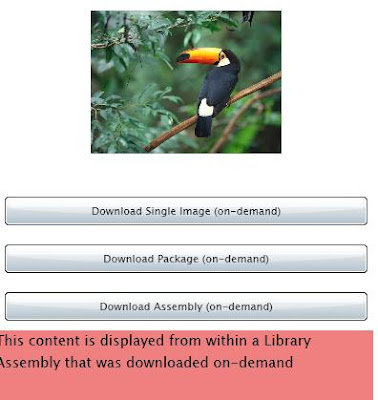
Using the WebClient to Download Content On-Demand

Source (Beta 2): The Beta 2 source is available here.


In this post I'm going to describe how you can use the WebClient class in Silverlight 2 to download content on-demand.

Firstly why would you want to download something on-demand? Say your application is displaying images, video, lots of XAML etc. Now if you allow the appplication to download all of this initially to the client, the user may get impatient because of the long waiting period. You may lose your user even before he has had a first look at your application.

So it makes sense to only include in the initial download, what is absolutely essential for the application to load. Once the application is loaded, you can start downloading other parts of the application behind the scenes. This is where downloading content on-demand comes into picture.

We'll look at three scenarios.

  1. Downloading a loose image file on-demand.

  2. Downloading a zip file on demand and retrieving an image file.

  3. Downloading an assembly on demand, and thereafter using classes within the assembly


The source for the sample application I created to illustrate this is available here.


Downloading a loose image file on-demand


In Silverlight 1.0, the class used for downloading content on-demand was the Downloader class. In Silverlight 2, we use the WebClient class.

private void Button_Click_1(object sender, RoutedEventArgs e)

{

WebClient wc = new WebClient();

wc.OpenReadCompleted += new OpenReadCompletedEventHandler(wc_OpenReadCompleted1);

wc.OpenReadAsync(new Uri("bird.jpg", UriKind.Relative));

}


void wc_OpenReadCompleted1(object sender, OpenReadCompletedEventArgs e)

{

if (e.Error == null)

{

StreamResourceInfo sri = new StreamResourceInfo(e.Result as Stream, null);

BitmapImage imgsrc = new BitmapImage();

imgsrc.SetSource(sri.Stream);

ImgToFill.Source = imgsrc;

}

}


This code is quite self-explanatory. You need to call the OpenReadAsync method ofthe WebClient, and then retrieve the image in the OpenReadCompleted event.


Downloading a package (zip file) on-demand and extracting an image file

In this case the code is similar.

To download a package
  1. Copy zip next to xap file
  2. Download as stream using WebClient
  3. Use StreamResourceInfo class to retrieve the desired part from the package stream
private void Button_Click_2(object sender, RoutedEventArgs e)

{

WebClient wc = new WebClient();

wc.OpenReadCompleted += new OpenReadCompletedEventHandler(wc_OpenReadCompleted2);

wc.OpenReadAsync(new Uri("mediaassets.zip", UriKind.Relative), "Garden.jpg");

}


void wc_OpenReadCompleted2(object sender, OpenReadCompletedEventArgs e)

{

if (e.Error == null)

{

StreamResourceInfo sri = new StreamResourceInfo(e.Result as Stream, null);

String sURI = e.UserState as String;

StreamResourceInfo sri2 = Application.GetResourceStream(sri, new Uri(sURI, UriKind.Relative));

BitmapImage imgsrc = new BitmapImage();

imgsrc.SetSource(sri2.Stream);

ImgToFill.Source = imgsrc;

}

}

Notice that after downloading the zip package, we did not have to unzip it explicitly. The StreamResourceInfo class took care of that.


Downloading an assembly on-demand and extracting an image file

What do we mean by downloading an assembly on-demand? Say you a large assembly that contains content like user controls, XAML etc. that you want to use in the application, but not in the first page that the application loads.

In this case you you can download the assembly on-demand instead of loading it at the beginning when the application is loaded by the client.

One question I had when I read of this concept was, wouldn't you have to reference the assembly in the application at design time itself to compile code that makes of its classes? And if you reference the assembly, won't it become part of the application's initial download to the client?

Yes, it is true that you need to reference the assembly, but you set the private attribute of the csproj file for that assembly to false. In this case, the assembly will not become part of the xap package, but you can still call classes of this assembly in the code base.

<ProjectReference Include="..\LargeSizeAssembly\LargeSizeAssembly.csproj">

<Project>{51238BB3-5EC5-4B01-BABD-779DBF69F623}Project>

<Name>LargeSizeAssemblyName>

<Private>FalsePrivate>

ProjectReference>

Summarizing the steps, this is what you need to do:
  1. Add reference to the assembly
  2. In the csproj file:set the 'Private' tag for that assembly to False
  3. Copy assembly next to xap file
  4. Download as stream using WebClient
  5. Use AssemblyPart class to load assembly to current AppDomain
  6. Now start using classes in the assembly

private void Button_Click_3(object sender, RoutedEventArgs e)

{

// Download assembly "on-demand"

WebClient wc = new WebClient();

wc.OpenReadCompleted += new OpenReadCompletedEventHandler(wc_OpenReadCompleted3);

wc.OpenReadAsync(new Uri("LargeSizeAssembly.dll", UriKind.Relative));

}


void wc_OpenReadCompleted3(object sender, OpenReadCompletedEventArgs e)

{

if (e.Error == null)

{

//Uncommenting the line below will throw an exception because the assembly

//in which Page2 resides has not been loaded into current AppDomain as yet

//Page2 page2 = new Page2();


// Convert the downloaded stream into an assembly that is

// loaded into current AppDomain

AssemblyPart assemblyPart = new AssemblyPart();

assemblyPart.Load(e.Result);

//now access classes in the downloaded assembly

DisplayPageFromLibraryAssembly();

}

}


private void DisplayPageFromLibraryAssembly()

{

// Instantiate type from assembly

Page2 page2 = new Page2();

// display it

LayoutRoot.Children.Add(page2);

}


You can see how powerful this option of downloading on-demand is. The source for the sample application I created to illustrate this is available here.

Tuesday, April 22, 2008

XAMLPad for Silverlight

XAMLPad is a tool for WPF that ships with the Windows SDK, and allows you to easily parse and render XAML snippets. As far as I know XAMLPad for Silverlight is not available as yet. However, Robby Ingebretsen who also works for IdentityMine has added Silverlight support to his Kaxaml tool. After you launch Kaxaml, you can open a new tab either in WPF, or in Silverlight.

By the way, this tool has been created in WPF. Really cool!

Detecting Screen Width and Height from within a Silverlight app

There are no direct API's that allow you to detect the screen width and height from within a Silverlight plug-in. But this post by Ashish Shetty tells you how to do this.

Friday, April 18, 2008

Differences between the WPF and Silverlight 2 model

What are the differences between the WPF and Silverlight 2 model? If you have worked with WPF before you started working with Silverlight (like me!), then this is no doubt a key question lingering in your mind. I understand that Microsoft is planning to publish such a list, and that would be great when it comes. But until that is published, below is a list of differences that I have picked so far. Remember this is a comparision between WPF and Silverlight 2 Beta 1. Some of the gaps between these two related technologies may be filled in future releases of Silverlight.

The observations below are what apply to Silverlight 2 Beta 1.

Styles
  • Once you apply a style to a FrameworkElement, you cannot reassign a new style. This is bad news because this means that the user cannot pick a theme. Having said that, you can still reassign properties that have been once assigned. This means that you can reassign the control template since it is a property as well.
  • Styles cannot inherit from other styles - the 'BasedOn' property cannot be used.
  • Styles have to be referenced by a key. This means that you cannot drop a style for a button in your 'application.resources' hoping that all buttons in the application will pick up the style. You need to explicitly reference it by its key in all buttons in the application. Sigh!

Triggers

See my earlier post on this. There are no triggers in Silverlight Beta 1 for styles, control templates and data templates. Sigh, sigh and more sigh!

Say you are changing the control template of a button. When doing that, as part of the template you would want to define an animation that should fire when the mouse is over it. In WPF, you would just add a trigger in the control template that looks for the IsMouseOver property - which is a neat way of doing things. But in Silverlight, the developer who creates the control has to create event handlers for the MouseEnter and MouseLeave events, and in these event handlers he has to load storyboards with well known names. Then hope that the designer/developer skinning the control will supply storyboards with the same names!

Control Templates

Keeping aside the limitation control templates have that I explained above (in the triggers section), I think this is one area that Silverlight is better than WPF. Silverlight follows the parts model. This means that any control (controls that ship with Silverlight and custom controls) publish a well defined control contract. This control contract will define

  1. the minimum UIElements (and their names) that should be present in a control template for that control
  2. the storyboards (and their names) that should be present.

So this means that a designer/developer who is going to skin (or define a new control template for) the control needs to only look at the control contract to understand what the control expects to function properly.

In WPF, you have to search for the "PART_" prefix in the default control template. There is no well-defined control contract. I understand from the MIX talks that this is one area that WPF, the big brother, will listen to Silverlight and emulate it in future WPF releases.

Also, a custom control in Silverlight cannot inherit from UIElement or FrameworkElement classes though these classes are present (by the way, there is no Visual class in the class hierarchy in Silverlight). Custom controls should extend the Control class, or other classes like TextBox or Button that extend the Control class.

What makes skinning a control (read changing its control template) really complicated now is that at the moment Blend does not support templating. I'm sure that is coming. But until then, your XAML editing skills will be put to the test!

Resources

Dynamic resource references are not available. All are static references.

Data Binding

The following apply to Silverlight 2 Beta 1:

  • No binding the property of a UI control to the property of another UI control. There is no 'ElementName' property in the binding syntax.
  • No 'RelativeSource'
  • No 'OneWayToSource' - who needed it anyway?
  • No UpdateSourceTrigger property. All updates to the source (for two way binding) happen immediately, except in the case of TextBox in which case changes are propogated to the source when the focus is lost.
  • Cannot bind directly to XML data. Need to convert the XML to CLR objects, and then bind to the CLR object.
  • No ReadOnlyObservableCollection. Fortunately, the ObservableCollection is available which is more important.
  • No CollectionView for sorting and filtering.
  • No validation rules.
  • No DataTemplateSelector for dynamically selecting data templates based on data.
  • No XMLDataProvider and ObjectDataProvider.

Commanding

  • Commands and input bindings are not available in Silverlight 2 Beta 1.

These are a few things I observed about Silverlight 2. I plan to keep this list updated so that this will be a ready reference for someone looking for the differences between the WPF and Silverlight 2 model.